- When you click on RUN PRACTICAM ONLINE link at the bottom of this page, the following screen appears:
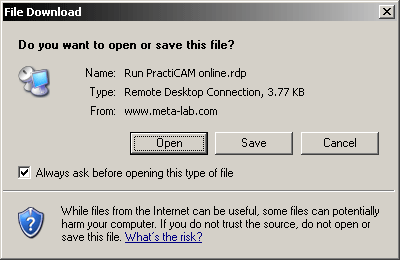
- Press the Open button. This action will start a Remote Desktop Connection and redirect you to our online PractiCAM server.
- The connection screen for a user named Guest (this is you) will appear, prompting you for your password.
- Your password is Guest
- Enter your password, and press OK button.
- PractiCAM will start (you may want to have your PractiGuide printed and handy...).
- When you finish running PractiCAM, simply exit, and you will return to this Web page.
If you have any difficulty doing all this, please call us at 281.870.1014 or 866.870.1014 (toll-free) during normal business hours, and we will be happy to walk you through the entire procedure.